How to Make the Most of Your Babysitter Profile
To get noticed by families on CareFinder and increase your matching opportunities, the quality of your profile is vital. Your profile is your "resume" and represents the very first impression parents have of you. Therefore, it is important to showcase not just your experience and skills, but also a positive attitude and a sense of responsibility. You want to create content that makes parents feel safe and confident in leaving their children with you. Let’s start by covering the basic points!
1. Profile Photo Tips
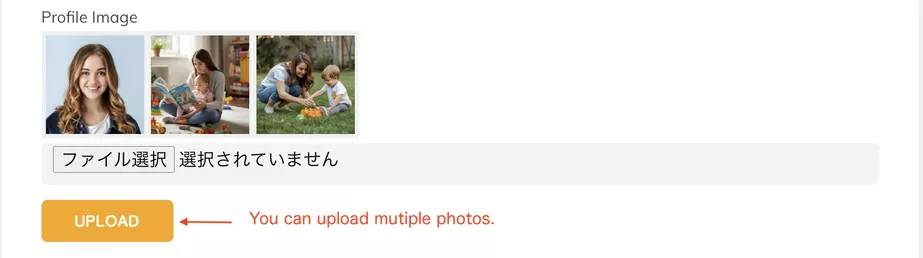
Your profile photo is the first piece of information parents see. First impressions are largely determined by your photo. Keep the following in mind:
- Use a front-facing headshot that highlights brightness, a smile, and cleanliness.
- Ensure your face is clearly visible (avoid hats or sunglasses).
- We recommend having someone else take the photo rather than using a selfie. This helps convey a natural expression and posture, leading to a more trustworthy impression.
- You may add sub-photos showing you interacting safely with children or engaging in activities.
Note: If you post photos of children, you must obtain permission from their parents first.
2. Self-Introduction
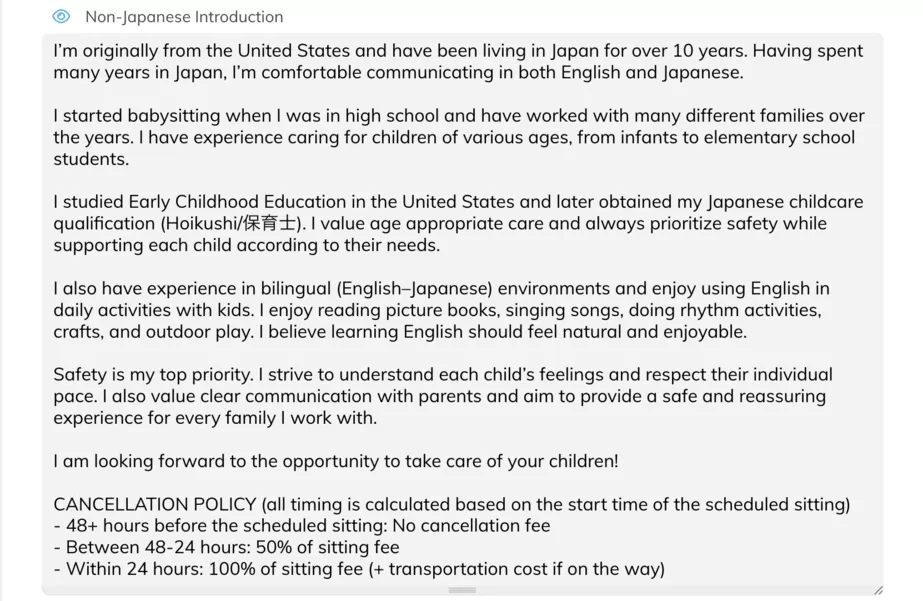
The self-introduction is a crucial section for conveying your personality and experience. Structure it as follows:
- Basic Information: Your hometown (especially if you are from overseas or have lived both in Japan and abroad) and any relevant education, such as childcare certifications or early childhood education studies.
- Childcare Experience: State how long and in what capacity you have worked in childcare. (Keep this brief here, as you can provide details in the "Experience" section). Including experience caring for family members or teaching English to children is perfectly fine.
- Favorite Activities & Childcare Philosophy: Describe the games or educational activities you can do with children and your approach/values regarding childcare. This helps parents visualize what kind of sitter you are.
- Cancellation Policy: You must include the standard CareFinder cancellation policy. Please use the content provided in the guidelines.
- Other Language Skills: List any languages (other than Japanese/English) in which you can communicate with parents (via chat or in person). Parents judge your communication skills based on your writing, so do not use translation software—write in your own words.
- Hobbies & Special Talents: Mention anything that could be an asset when interacting with children.
Tip: Keep it concise and easy to read. Instead of long, overly detailed paragraphs, focus on organizing your points clearly.
3. Uploading ID and Certifications
- CareFinder requires a photo ID and documents confirming your address. Before your interview with CareFinder, please ensure you have the following ready:
- Driver’s License (include the back if the address has changed).
- My Number Card. Residence Card (Mandatory for foreign nationals; must show a valid visa. Please submit both sides).
- Passport photo page (For Japanese nationals). Note: If submitting a passport, you must also provide a separate document confirming your address.
If you hold childcare-related qualifications or training certificates, please upload those as well (e.g., Childcare Worker License, Nursing License, Kindergarten Teacher License, First Aid/CPR Certification).
4. Experience Section
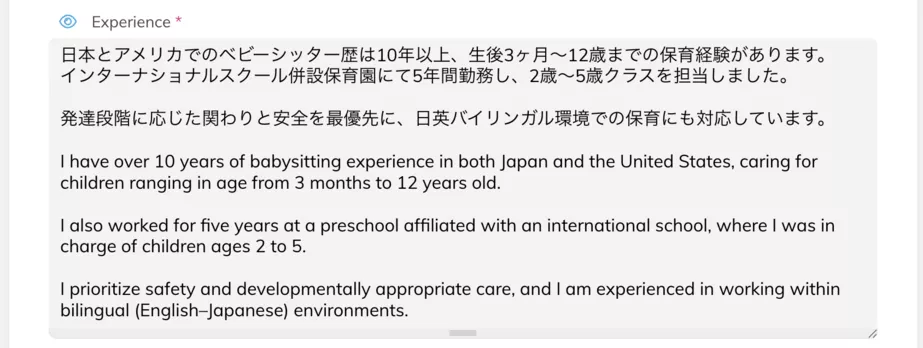
Organize your history by "what age groups you cared for and for how long":
- Ages of children: (Infants, toddlers, elementary students, etc.)
- Context of care: (Homework support, English education, event sitting, etc.)
- Special needs: Experience handling specific requirements.
What Parents Look For
When parents browse profiles, they prioritize:
- Is the profile organized and easy to read?
- Are the specific types of childcare/support offered clearly stated?
- Is the sitter's philosophy conveyed? (e.g., "Safety first," "Empathetic care," "Encouraging independence").
- Do they show a sense of responsibility and professionalism?
Review Your Public Profile
Once you’ve updated your profile, check how it looks to parents. In your CareFinder's account, click your display name (blue text) to view your public profile.
Ask yourself:
- Is the layout easy to read?
- Are there any typos or unnatural expressions?
- Is the photo impression good?
- Are my strengths conveyed clearly?
A profile is not "one and done." You can update it as you gain more experience or complete new training. Regularly reviewing your content ensures your profile remains trustworthy and attractive.
Point of Reference:
For an idea of how a good, easy to understand babysitter profile should look, you can check out the profiles below of our current CareFinder Team Members who also babysit.
Happy CareFinding!